Privacy and your data
Your documents, chats and API keys stay on your Mac. PDF Pals never moves or changes your files.
What goes to the AI provider
- Answers: with a cloud model, your question and the passages needed to answer it go to that provider.
- Search: the Embedding model in Settings ▸ Models decides where documents are indexed. The local model keeps indexing on your Mac.
- Local mode keeps everything on your Mac. See local mode and local models.
Hide personal details
In Settings ▸ Privacy ▸ Hide before sending to AI, choose what to replace before text leaves your Mac: Credit card numbers, Email addresses, Phone numbers and Monetary amounts.
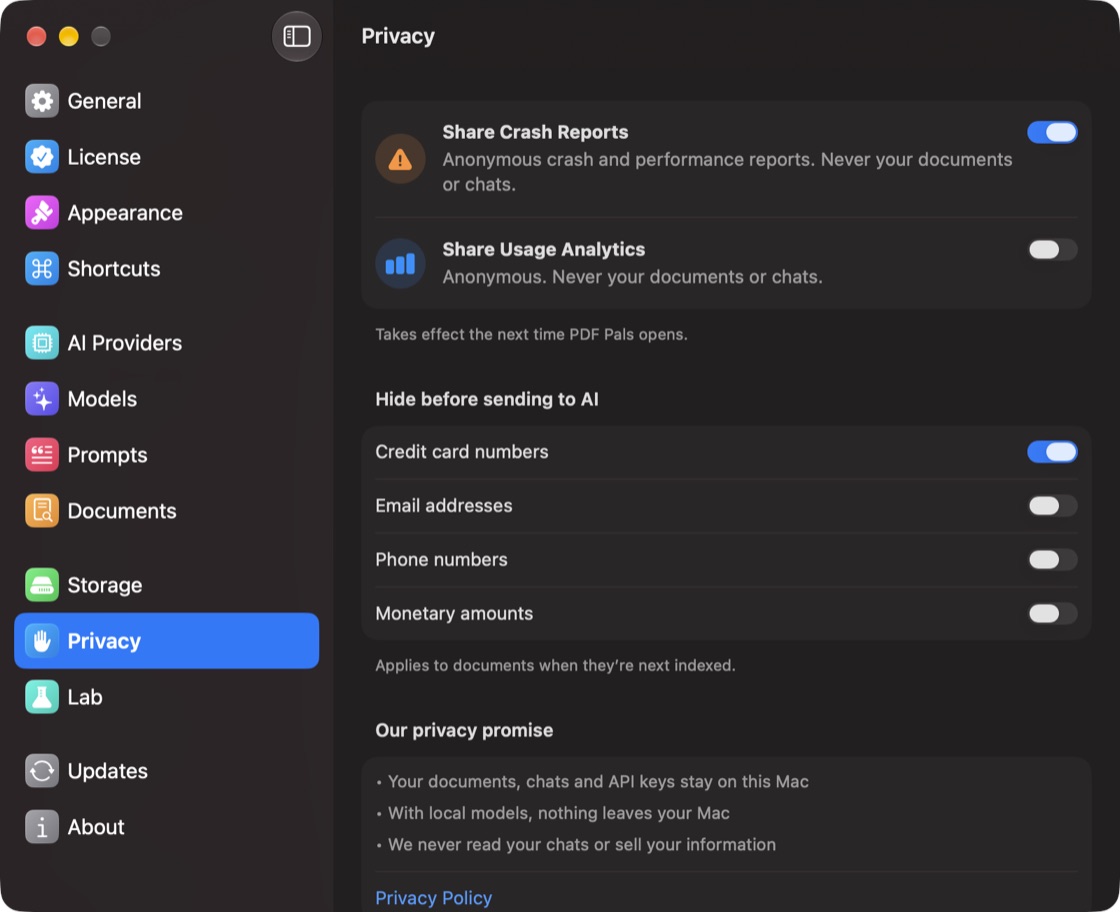
This applies to documents the next time they're indexed. To apply it now, choose Re-index Everything… at the bottom of Documents.
Crash reports and analytics
Share Crash Reports and Share Usage Analytics in Settings ▸ Privacy are anonymous and never include your documents or chats.
Delete old chats
In Settings ▸ Storage, Keep chats can move chats older than 1 year or 30 days to the Trash. Pinned chats are kept. All chats ▸ Delete… deletes every chat. Your documents stay in the library.
